AWS Aurora vs. Azure vs. Google Cloud SQL vs. Oracle HeatWave: Finding Your MySQL Soulmate
SQLFlash
33 min read

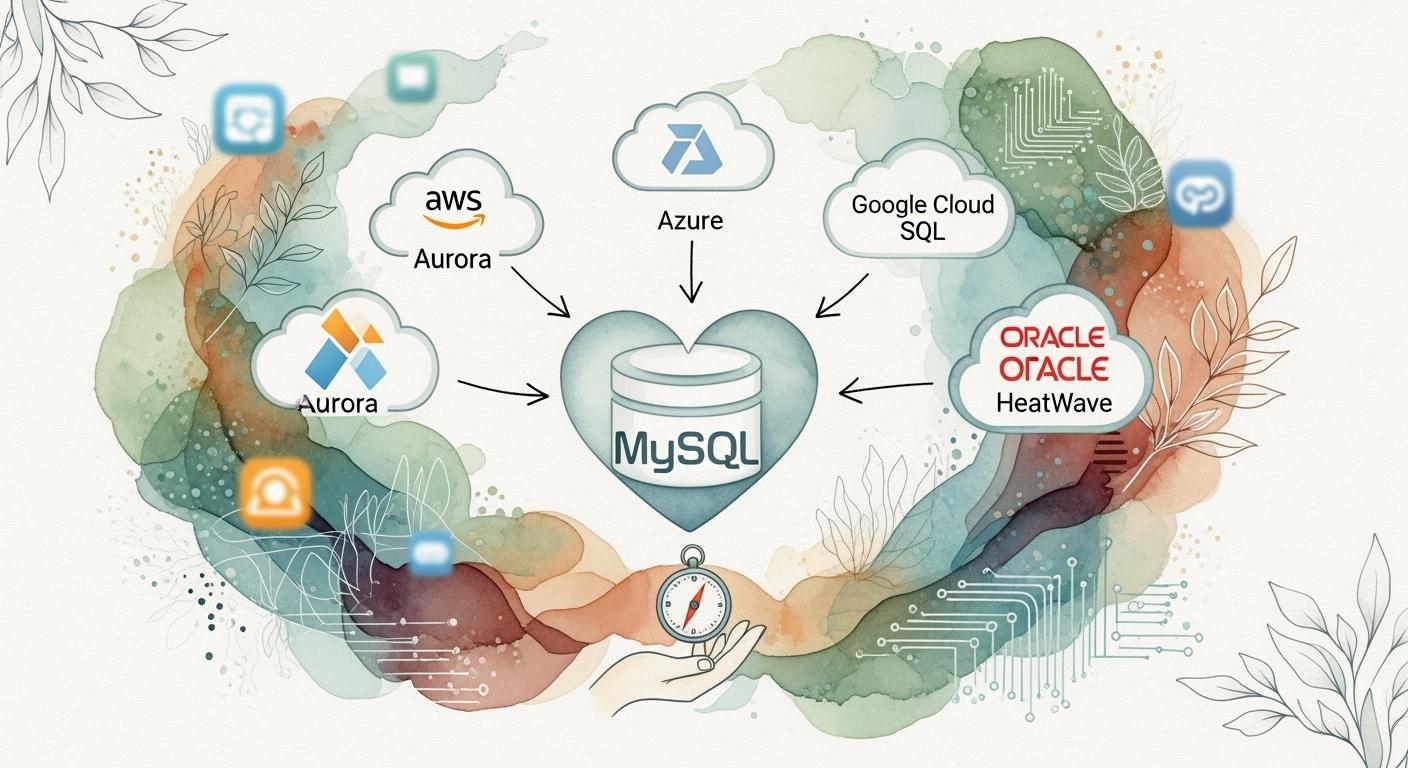
You need a MySQL cloud service that matches your business priorities. Whether you value speed, cost, or seamless integration, the right choice depends on what matters most for your workload. Consider how Amazon Aurora MySQL, Azure Database for MySQL, Google Cloud SQL, and Oracle HeatWave address these crucial criteria:
| Criteria | Description |
|---|---|
| Reliability & Performance | Global infrastructure footprint, latency management, and data residency for critical applications |
| Pricing | Transparent cost structure and hidden fees |
| Certifications & Standards | Compliance with ISO 27001 and industry best practices |
| SLAs | Service level objectives and remediation policies |
| Data Governance & Security | Data regulation compliance and location flexibility |
Tip: Weigh each factor against your organizational goals. By the end, you will confidently select the MySQL solution that fits.
Choose a MySQL cloud service based on your business needs, such as speed, cost, and integration.
Amazon Aurora MySQL offers high performance and reliability with a 99.99% uptime SLA.
Azure Database for MySQL provides flexible pricing and strong compliance for regulated industries.
Google Cloud SQL for MySQL is user-friendly and integrates well with Google services for analytics.
Oracle HeatWave MySQL excels in analytics performance, offering up to 10x faster query results.
Consider hidden costs like backup storage and data transfer when estimating your total expenses.
Utilize scaling features to optimize performance and manage costs effectively across all platforms.
Take advantage of migration tools provided by each service to ensure a smooth transition to the cloud.
You want a database that delivers consistent speed, especially during peak demand. Amazon Aurora MySQL stands out for its superior performance in high-volume workloads, offering better throughput and lower latency than traditional MySQL services. Aurora’s architecture separates compute and storage, which helps you scale quickly and maintain fast response times. However, benchmark tests show that while Aurora outperforms standard MySQL, some competitors like SkySQL deliver even higher throughput and lower latency. For example, SkySQL achieved up to three times the throughput and 2.5 times lower latency compared to Aurora in TPC-C benchmark tests. Aurora remains a strong choice for most business applications, but you should consider these metrics if ultra-low latency is critical.
Reliability is essential for your business. Amazon Aurora MySQL offers a robust uptime guarantee, with a Service Level Agreement (SLA) of 99.99%. This high availability is supported by automatic failover and data replication across multiple Availability Zones. You can expect minimal downtime, which is vital for mission-critical workloads.
Aurora’s replication features help you maintain data integrity and availability. You can deploy up to 15 read replicas to handle heavy read traffic. Aurora uses quorum-based replication, which reduces lag and ensures durability. If the primary instance fails, Aurora automatically promotes a read replica, minimizing disruption. This setup supports disaster recovery and business continuity.
Amazon Aurora MySQL offers flexible pricing models. You pay only for what you use, with options for On-Demand and Reserved Instances. Charges include database instances, storage, and optional features. Aurora I/O-Optimized configuration can save you up to 40% if your I/O spend exceeds 25% of total costs. Standard pricing suits applications with moderate I/O usage. Compared to other managed MySQL services, Aurora’s costs are generally higher than standard RDS MySQL but competitive with enterprise-grade solutions.
You should watch for additional fees. These may include replicated write I/O operations for Global Database, backtrack storage, backup storage, and data transfer costs. Aurora’s advanced features can add to your bill if you use global replication or frequent backups.
You can reduce costs by using Data Lifecycle Policies to archive infrequently accessed data. Monitor CPU credits to ensure efficient resource usage and scale up if needed. Implement query caching to minimize CPU and storage I/O. Scheduled scaling with AWS Lambda can adjust capacity based on workload patterns, saving 20% to 50%. Aurora Global Database supports disaster recovery and can lower infrastructure costs by up to 50% compared to traditional setups.
Aurora’s storage starts at 10GB and scales automatically in 10GB increments up to 128 TiB. You can deploy up to 15 read replicas to handle read-heavy workloads. Write operations are limited to one primary instance, similar to RDS.
| Feature | Description |
|---|---|
| Storage Capacity | Scales from 10GB to 128 TiB automatically |
| Read Replicas | Up to 15 for handling read traffic |
| Write Operations | One primary instance |
| Fault Tolerance | Replication across three Availability Zones |
| Failover | Automatic promotion of read replica on failure |
Aurora supports several multi-region strategies. You can choose Pilot Light, Warm Standby, or Hot Standby setups for disaster recovery. Aurora Global Database enables low-latency global reads and fast recovery across AWS Regions, making it ideal for global applications.
Aurora adapts to various workloads, from business intelligence to e-commerce. Its architecture supports high query loads and multiple readers, making it suitable for applications that demand scalability and reliability. Aurora maintains compatibility with standard MySQL, so you can migrate existing databases with minimal changes.
Tip: Monitor your workload patterns and use Aurora’s scaling features to optimize both performance and cost.
You want a database that stands out with advanced features. Amazon Aurora MySQL offers several unique capabilities that help you manage demanding workloads and scale with ease.
| Feature | Description |
|---|---|
| High Performance and Scalability | Uses advanced techniques to optimize performance and resource use. |
| Push-Button Compute Scaling | Lets you scale compute and memory resources quickly and easily. |
| Storage Auto-Scaling | Adjusts storage size automatically, so you do not need to manage it manually. |
| Low-Latency Read Replicas | Supports up to 15 replicas that share storage, ideal for high-volume applications. |
| Serverless Configuration | Offers auto-scaling that adjusts capacity based on demand. |
| Global Database | Spans multiple regions for fast local reads and disaster recovery. |
| Cost-effectiveness | No upfront costs; you pay only for what you use. |
| Developer Productivity | Integrates machine learning capabilities directly into the database. |
Note: These features help you handle growth, reduce manual work, and keep costs predictable.
You need strong security and compliance for your data. Amazon Aurora MySQL provides:
Encryption at rest and in transit to protect your data.
Integration with AWS Identity and Access Management (IAM) for fine-grained access control.
VPC peering to isolate your database within your network.
Automatic backups and continuous data replication for durability.
Protection against DDoS attacks through AWS Shield.
Compliance with industry standards such as ISO 27001, SOC, and PCI DSS.
These features help you meet strict regulatory requirements and keep your data safe.
You can connect Amazon Aurora MySQL with many AWS services to build powerful solutions:
Seamless integration with AWS Lambda for event-driven applications.
Direct connections to Amazon S3 for data import and export.
Compatibility with MySQL so you can migrate existing applications without major changes.
Monitoring and alerting through Amazon CloudWatch.
Scaling and automation using AWS Auto Scaling and CloudFormation.
Tip: Use these integrations to automate tasks, improve reliability, and speed up development.
You get access to a large community and extensive documentation. AWS provides:
Detailed guides and tutorials for setup and management.
Active forums where you can ask questions and share solutions.
Regular updates and best practices from AWS experts.
This support helps you solve problems quickly and stay up to date.
You can choose from several support options:
AWS Basic Support for general questions.
Developer and Business Support for faster response times and technical guidance.
Enterprise Support for 24/7 access to cloud experts and proactive monitoring.
These options let you pick the right level of help for your needs.
You have multiple tools to move your data to Amazon Aurora MySQL:
RDS for MySQL DB snapshot for direct migration.
mysqldump utility to export and import data.
Percona XtraBackup for backup and restore using Amazon S3.
LOAD DATA FROM S3 to import text files.
AWS Database Migration Service (AWS DMS) for migrating from non-MySQL databases.
Tip: These tools make migration smooth, whether you move from on-premises or another cloud.
You need reliable performance for your MySQL workloads. Azure Database for MySQL delivers consistent throughput, but benchmark tests show it trails behind some competitors in raw speed. For example, ScaleGrid’s tests highlight that Azure’s throughput for read-intensive and balanced workloads is lower than other managed MySQL solutions. The table below shows how Azure compares in queries per second (QPS):
| Workload Type | Threads | ScaleGrid Throughput (QPS) | Azure Throughput (QPS) | ScaleGrid Improvement |
|---|---|---|---|---|
| Read-Intensive | 25 | 5,299 | 1,689 | 214% |
| Read-Intensive | 50 | 6,092 | 2,302 | 165% |
| Read-Intensive | 100 | 8,429 | 2,877 | 193% |
| Balanced | 25 | 3,806 | 1,748 | 118% |
| Balanced | 50 | 5,834 | 2,437 | 139% |
| Balanced | 100 | 6,365 | 2,712 | 135% |
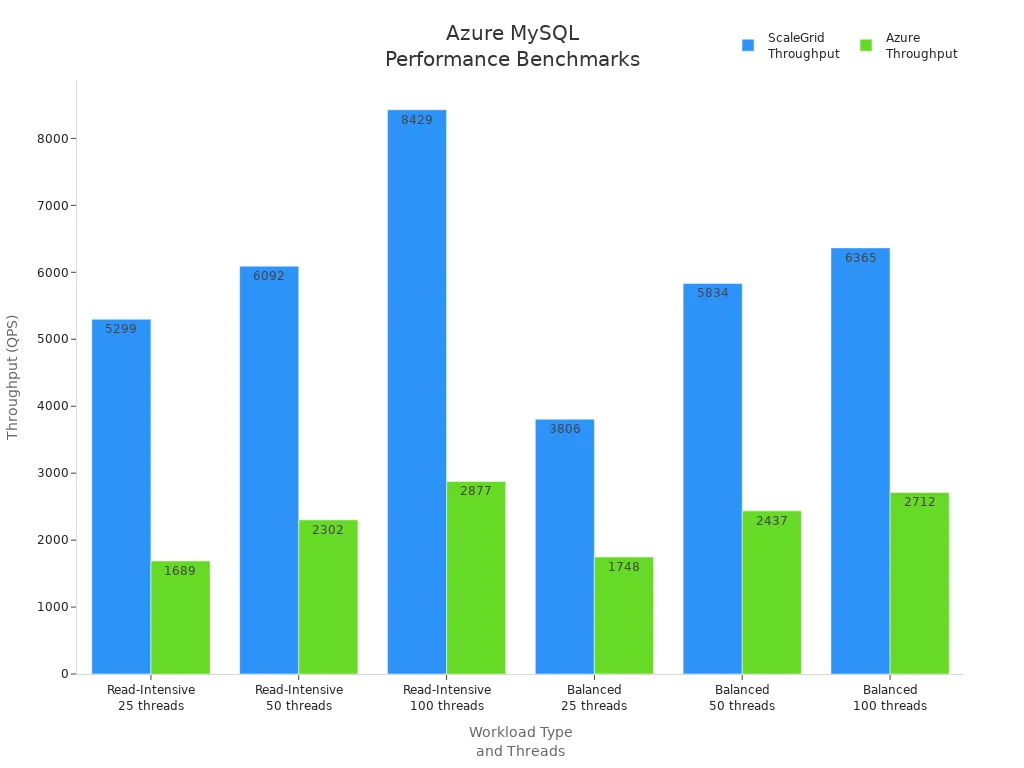
You should note that Azure Database for MySQL supports the latest MySQL versions, ensuring compatibility with modern applications. However, if you need the highest throughput, Amazon Aurora MySQL and Google Cloud SQL for MySQL offer higher performance ceilings.
You want your database to stay online. Azure Database for MySQL provides a 99.99% uptime SLA. This high availability comes from built-in redundancy and automated failover. You can trust Azure to keep your data accessible, even during maintenance or unexpected outages.
Azure Database for MySQL supports read replicas, which help you scale out read-heavy workloads and improve fault tolerance. You can deploy up to five read replicas per primary server. If the primary server fails, you can promote a replica to minimize downtime. This setup supports disaster recovery and business continuity.
Azure Database for MySQL uses a pay-as-you-go pricing model. You choose between General Purpose and Business Critical tiers. The Business Critical tier targets high-performance workloads and offers in-memory performance for faster transactions. The table below summarizes key pricing details:
| Pricing Tier | Description | Additional Costs |
|---|---|---|
| Business Critical | High performance, in-memory, high concurrency | Extra IOPS, backup storage, read replica charges |
| Backup Storage | Free up to 100% of provisioned storage | Geo-redundant storage costs double |
| Read Replica | Scales out read workloads | Each replica incurs compute and storage charges |
Tip: Always review your expected workload and storage needs to avoid surprises on your bill.
You may encounter extra charges for backup storage beyond your provisioned amount, geo-redundant backups, and additional read replicas. High IOPS usage can also increase costs. Plan for these factors when estimating your total spend.
You can control costs with several strategies:
| Strategy | Description |
|---|---|
| Scale your database | Adjust compute and storage to match demand |
| Plan your RPO | Set recovery points to avoid excess backup costs |
| Use Flexible Server SKU | Stop and start servers for non-production workloads |
| Choose appropriate server size | Right-size your server to avoid over-provisioning |
| Consider Reserved Capacity | Commit to 1 or 3 years for lower compute costs |
Note: Flexible Server lets you pause non-production databases, which can save you money.
Azure Database for MySQL gives you elastic scalability. You can scale compute and storage resources independently and almost instantly. This flexibility helps you handle traffic spikes without downtime. You can also use autoscale IOPS to adjust performance as your workload changes.
You can deploy read replicas in different Azure regions to improve global performance and support disaster recovery. Cross-region replication is available through data-in replication, with native cross-region read replicas planned for the future.
Azure Database for MySQL supports a wide range of workloads, from web apps to analytics. You can use high availability architectures, such as Same Zone HA for low-latency recovery or Zone-Redundant HA for resilience. The service remains compatible with the latest MySQL versions, so you can run modern applications with confidence.
Azure Database for MySQL offers a balance of price, performance, and flexibility, making it a solid choice for many cloud-native workloads.
You gain flexibility and control with Azure Database for MySQL – Flexible Server. This deployment option offers several advanced features that help you optimize performance and manage costs:
Choose AMD compute SKUs in General Purpose and Business Critical tiers for strong price-performance.
Use autoscale IOPS to adjust input/output operations per second based on your workload, so you only pay for what you need.
Perform major version upgrades with minimal effort, keeping your database up to date with the latest MySQL features.
Manage your MySQL databases alongside others using the MySQL extension for Azure Data Studio, which boosts productivity.
Monitor your database with enhanced metrics for better visibility into performance.
Set flexible maintenance windows to control when updates occur, reducing disruption.
Replicate data to read-only servers in other regions with Universal Cross Region Read Replica for global scalability.
Secure your database with Private Link, which provides private endpoints for network security.
Restore databases to alternate regions using Universal Geo Restore for disaster recovery.
Tip: Flexible Server gives you the tools to balance cost, performance, and operational control for your MySQL workloads.
You need to protect sensitive data and meet regulatory requirements. Azure Database for MySQL supports a wide range of compliance standards, making it suitable for industries with strict security needs.
| Compliance Standard | Description |
|---|---|
| ISO 27001:2013 | Information security management |
| ISO 27018:2014 | Protection of personal data in the cloud |
| CSA STAR Attestation | Cloud Security Alliance STAR Attestation |
| CSA STAR Certification | Cloud Security Alliance STAR Certification |
| HIPAA / HITECH Act | Healthcare data protection |
| PCI DSS Level 1 | Payment card industry compliance |
| SOC1, SOC2, SOC3 | Service Organization Control compliance |
| EU Model Clauses | EU data protection regulations |
| UK G-cloud | UK government cloud standards |
You benefit from built-in encryption, access controls, and network isolation. These features help you secure your environment and pass audits with confidence.
You can enhance your database experience by integrating with the Azure ecosystem. Azure Database for MySQL connects seamlessly with other Azure services, which streamlines operations and boosts reliability.
| Feature | Description |
|---|---|
| Automated Backups | Protects your data with regular, hands-free backups. |
| Built-in Security Controls | Adds layers of security, including encryption and access management. |
| High Availability Configurations | Delivers a 99.99% uptime SLA with zone-redundant setups for mission-critical workloads. |
| Integration with dbForge Studio | Simplifies management and optimization for developers and administrators. |
Note: Azure’s integration ecosystem helps you automate, monitor, and secure your MySQL databases with minimal effort.
You have access to a robust community and comprehensive documentation. Microsoft provides detailed guides, tutorials, and best practices. You can find answers quickly in forums and connect with other professionals who use Azure Database for MySQL.
You can choose from multiple support plans to match your needs. Options range from basic support for troubleshooting to premium plans with 24/7 access to Azure engineers. This flexibility ensures you get help when you need it, whether you run a small project or a large enterprise deployment.
You can migrate your data to Azure Database for MySQL using a variety of tools:
MySQL Workbench for schema and data migration.
mysqldump for exporting and importing databases.
mydumper and myloader for high-performance data transfer.
binlog replication for continuous data sync.
Azure Database Migration Service (DMS) for guided, large-scale migrations.
Tip: These migration tools make it easy to move from on-premises or other cloud platforms, reducing downtime and complexity.
You want a database that delivers reliable speed for your applications. Google Cloud SQL for MySQL offers solid performance for most workloads, but independent benchmarks show that it does not lead in raw throughput or latency. The table below compares Google Cloud SQL with other popular solutions:
| Database Solution | QPS Performance | p99 Latency | Performance Consistency |
|---|---|---|---|
| PlanetScale Metal | High | Low | Most Consistent |
| Amazon Aurora | Comparable | Higher | Less Consistent |
| Google Cloud SQL | Lower | Higher | Inconsistent |
You should consider these results if your business depends on ultra-fast response times or consistent performance. Google Cloud SQL supports the latest MySQL versions, so you can run modern applications without compatibility issues.
You need your database to stay online. Google Cloud SQL for MySQL provides a 99.95% uptime SLA for single-zone deployments and 99.99% for high availability configurations. Automatic failover and synchronous replication help you maintain business continuity, even during outages.
You can deploy read replicas to scale out read-heavy workloads. Google Cloud SQL supports up to 10 read replicas per primary instance. If the primary fails, the system promotes a standby instance, ensuring minimal downtime and data loss.
You want predictable costs for your cloud database. Google Cloud SQL for MySQL uses a pay-as-you-go model, with options for shared-core and dedicated-core instances. The table below summarizes key pricing details:
| Category | Details |
|---|---|
| Instance Pricing | Shared-Core Instances (e.g., db-f1-micro) are cheaper; Dedicated-Core Instances are more costly. |
| Example Pricing | 4 vCPUs, 15 GB memory → $0.386/hour or ~$282.39/month (on-demand pricing). |
| CPU and Memory Costs | vCPUs: $0.054/hour for on-demand usage; HA vCPUs: $0.108/hour. |
| Storage Costs | SSD Storage: $0.222/GB/month; HDD Storage: $0.118/GB/month; Backup Storage: $0.105/GB/month. |
| Networking Costs | Ingress Traffic: Free; Egress Traffic: $0.12/GB between regions; $0.19/GB to the internet. |
| Discounts | On-Demand Pricing; Committed Use Discounts (CUDs) available for one or three-year usage. |
| Additional Costs | Licensing Costs; IPv4 Idle Fees: $0.013/hour; Extended Support: Additional fees apply. |
Tip: Compare these costs with Amazon Aurora and Azure Database for MySQL to find the best fit for your budget and workload.
You should watch for extra charges, such as backup storage beyond your provisioned amount, egress traffic between regions, and IPv4 idle fees. Extended support and licensing may also increase your total spend.
You can save money by choosing the right configuration for your workload. Select shared-core instances for development or small projects. Use dedicated-core instances for production workloads. Take advantage of committed use discounts for long-term savings. Pay-as-you-go pricing helps you avoid upfront costs and scale resources as needed.
Select the edition that matches your performance needs.
Use committed use discounts for predictable workloads.
Pay only for what you use with flexible billing.
You can scale your database to handle growing traffic and product catalogs. Google Cloud SQL lets you increase read capacity horizontally by adding read replicas. You can also scale vertically by upgrading to a higher-tier instance with minimal downtime.
Add read replicas to handle more queries.
Upgrade your instance for more CPU and memory.
Cloud SQL Enterprise Plus allows you to scale quickly, so you can manage traffic spikes or planned events without disruption.
You can deploy database instances across multiple geographic regions to reduce latency for global customers. Google Cloud SQL provides redundancy through a primary and standby instance within a regional configuration. Synchronous replication ensures all writes are committed to both zones before completion. If a failure occurs, the standby instance takes over, maintaining uptime.
| Feature | Description |
|---|---|
| Data Redundancy | Redundancy through primary and standby instances in a region. |
| Synchronous Replication | Writes are replicated to both zones before commit. |
| Failover | Standby instance takes over as primary during failure. |
Note: Global Payments used Google Cloud SQL to build a resilient, multi-region solution with near-zero planned downtime and rapid recovery.
You can run e-commerce, web applications, and analytics workloads on Google Cloud SQL for MySQL. Seamless integration with Google Cloud services, such as BigQuery and Cloud Storage, helps you build scalable solutions. High availability and flexible scaling options make it easy to support business growth.
You want a database that lets you focus on your business, not on maintenance. Google Cloud SQL for MySQL offers a fully managed experience. You do not need to worry about patching, backups, or scaling. The platform handles these tasks for you, so you can spend more time improving your application.
| Feature/Benefit | Description |
|---|---|
| Fully Managed Databases | Reduces maintenance costs, allowing you to focus on application improvement. |
| Automated Backups | Ensures business continuity with easy data recovery in case of disasters. |
| Automated Task Management | Supports scaling by automating storage, backup, and capacity management tasks. |
You can rely on automated backups and point-in-time recovery. These features protect your data and help you recover quickly if something goes wrong. The system also automates storage and capacity management, so your database grows with your needs.
You need to keep your data safe and meet industry standards. Google Cloud SQL for MySQL provides strong security features. The service encrypts your data at rest and in transit. You can set up private IP connectivity and use firewalls to control access. The platform supports compliance with standards like ISO 27001, PCI DSS, and HIPAA.
Data encryption protects sensitive information.
Firewalls and private IPs restrict unauthorized access.
Compliance certifications help you meet regulatory requirements.
Tip: Enable automated backups and set up alerts for suspicious activity to strengthen your security posture.
You want your database to work well with other tools. Google Cloud SQL for MySQL integrates easily with Google Cloud services. You can connect your database to BigQuery for analytics or use Cloud Functions for event-driven workflows. Integration with Google Kubernetes Engine (GKE) helps you build scalable, cloud-native applications.
Connect to BigQuery for advanced analytics.
Use Cloud Storage for easy data import and export.
Automate workflows with Cloud Functions and Pub/Sub.
Note: Seamless integration with Google Cloud services boosts your productivity and unlocks new capabilities for your applications.
You gain access to a large community and detailed documentation. Google provides step-by-step guides, best practices, and troubleshooting resources. You can join forums to ask questions and share experiences with other users.
Extensive documentation covers setup, management, and optimization.
Community forums offer peer support and expert advice.
You can choose from several support plans to match your needs. Basic support covers general questions. Premium support gives you 24/7 access to Google engineers and faster response times. This flexibility ensures you get help when you need it.
Basic support for troubleshooting.
Premium support for mission-critical workloads.
You can move your existing databases to Google Cloud SQL for MySQL with ease. The platform offers several migration tools:
Database Migration Service (DMS) for seamless, minimal-downtime migrations.
mysqldump and MySQL Workbench for exporting and importing data.
Third-party tools for complex or large-scale migrations.
Tip: Use Database Migration Service to reduce downtime and simplify your move to the cloud.
You want fast query results, especially for analytics workloads. Oracle HeatWave MySQL uses in-memory parallel processing to accelerate MySQL queries. In industry benchmarks, HeatWave often outpaces Amazon Aurora, Azure Database for MySQL, and Google Cloud SQL. For example, Oracle claims that HeatWave delivers up to 7x better price-performance than Amazon Aurora and up to 10x faster analytics than Google Cloud SQL. You can run complex queries on large datasets without slowing down your applications.
| Service | OLAP Query Speed | Price-Performance Ratio |
|---|---|---|
| Oracle HeatWave MySQL | Fastest | Best |
| Amazon Aurora MySQL | Moderate | Good |
| Google Cloud SQL | Slower | Fair |
| Azure Database MySQL | Slowest | Fair |
HeatWave supports MySQL 8.0, so you can use the latest features and syntax.
You need your database to stay online. Oracle HeatWave MySQL offers a 99.995% uptime SLA on Oracle Cloud Infrastructure (OCI). This high availability matches or exceeds the guarantees from AWS, Azure, and Google Cloud. Automatic failover and self-healing clusters help you avoid downtime.
You can set up asynchronous replication between HeatWave clusters. This feature lets you create read replicas for scaling and disaster recovery. If a primary node fails, HeatWave promotes a replica automatically. You keep your data safe and your applications running.
You pay only for what you use with Oracle HeatWave MySQL. Pricing includes compute, storage, and HeatWave analytics nodes. Oracle claims that HeatWave costs up to 50% less than Amazon Aurora for similar workloads. You can deploy HeatWave on OCI, AWS, or Azure, so you choose the cloud that fits your budget.
| Service | Starting Price (per vCPU/hr) | Analytics Add-on Cost | Multi-Cloud Support |
|---|---|---|---|
| Oracle HeatWave MySQL | $0.112 | Included | Yes |
| Amazon Aurora MySQL | $0.11 | N/A | No |
| Google Cloud SQL | $0.054 | N/A | No |
| Azure Database MySQL | $0.034 | N/A | No |
Note: HeatWave includes analytics acceleration at no extra charge, while other services may require separate analytics engines.
You should watch for extra charges. Data transfer between clouds, backup storage, and high IOPS usage can increase your bill. HeatWave’s analytics nodes use more memory, so plan for higher compute costs if you run large queries.
You can save money by right-sizing your HeatWave cluster. Use auto-scaling to match resources to your workload. Archive old data to reduce storage costs. Monitor query performance and adjust node counts as needed.
You can scale HeatWave clusters from small to very large. Add or remove nodes with a few clicks. The system supports up to 64 HeatWave nodes per cluster, so you handle millions of queries per hour.
You deploy HeatWave in multiple regions on OCI, AWS, or Azure. This flexibility lets you serve global users with low latency. You can replicate data across regions for disaster recovery.
You run transactional, analytical, and mixed workloads on HeatWave MySQL. The platform supports MySQL 8.0, so you use modern features. You can connect with business intelligence tools, run e-commerce sites, or analyze big data—all on one database.
Tip: Choose HeatWave if you need fast analytics, multi-cloud support, and strong price-performance for MySQL workloads.
In-Memory Analytics Acceleration
You get real-time analytics with HeatWave. The engine processes queries in memory, which speeds up complex reports and dashboards. You do not need to move data to a separate analytics platform.
Performance Metrics
HeatWave delivers up to 10x faster analytics than Google Cloud SQL and up to 7x better price-performance than Amazon Aurora. You can run OLAP and OLTP workloads on the same MySQL database.
No ETL Required
You avoid the cost and complexity of extract, transform, load (ETL) pipelines. HeatWave runs analytics directly on your transactional data.
Machine Learning Integration
You can train, explain, and deploy machine learning models inside MySQL. This feature reduces the need for external ML tools.
Tip: If you need fast analytics without extra infrastructure, HeatWave gives you a clear advantage over AWS, Azure, and Google Cloud.
End-to-End Encryption
You protect your data at rest and in transit with built-in encryption. HeatWave uses industry-standard protocols.
Access Controls
You manage user access with MySQL roles and Oracle Cloud IAM. This setup gives you fine-grained control over who can see or change your data.
Compliance Certifications
You meet strict standards, including ISO 27001, SOC, PCI DSS, and HIPAA. These certifications help you pass audits and build trust with customers.
Network Isolation
You can deploy HeatWave in a private subnet. This feature keeps your database isolated from public networks.
Note: Oracle HeatWave matches or exceeds the compliance features of AWS, Azure, and Google Cloud. You get strong security without extra cost.
Flexible Cloud Choices
You can deploy HeatWave on Oracle Cloud Infrastructure (OCI), AWS, or Azure. This flexibility helps you avoid vendor lock-in.
Global Reach
You serve users worldwide by choosing the closest region. Multi-region support reduces latency and improves user experience.
Consistent Version Compatibility
You run MySQL 8.0 everywhere. This consistency makes migrations and upgrades simple.
Unified Management
You manage all your HeatWave databases from a single console, even across clouds.
| Feature | Oracle HeatWave | Amazon Aurora | Google Cloud SQL | Azure Database MySQL |
|---|---|---|---|---|
| Multi-Cloud Support | ✅ | ❌ | ❌ | ❌ |
| Analytics Acceleration | ✅ | ❌ | ❌ | ❌ |
| MySQL 8.0 Support | ✅ | ✅ | ✅ | ✅ |
If you want analytics, security, and multi-cloud flexibility in one MySQL service, Oracle HeatWave stands out.
You want a MySQL cloud service that delivers reliable speed and uptime. The table below compares the four leading options on key performance metrics:
| Service | Max QPS (Benchmarks) | p99 Latency | Uptime SLA | Read Replicas | Version Support |
|---|---|---|---|---|---|
| Amazon Aurora MySQL | High (TPC-C: ~200k) | Low-Medium | 99.99% | Up to 15 | MySQL 5.7, 8.0 |
| Azure Database for MySQL | Moderate | Medium | 99.99% | Up to 5 | MySQL 5.7, 8.0 |
| Google Cloud SQL | Moderate | Medium | 99.99% (HA) | Up to 10 | MySQL 5.7, 8.0 |
| Oracle HeatWave MySQL | Highest (OLAP/OLTP) | Lowest | 99.995% (OCI) | Up to 18 | MySQL 8.0 |
Tip: If you need the fastest analytics or mixed workloads, Oracle HeatWave MySQL leads in both speed and price-performance. For general web and business apps, Amazon Aurora MySQL offers strong, consistent throughput.
You need to understand the cost structure before you commit. Here’s a quick comparison of starting prices and pricing models:
| Service | Starting Price (per vCPU/hr) | Storage Cost (per GB/mo) | Analytics Add-on | Discounts/Commitments | Notable Fees |
|---|---|---|---|---|---|
| Amazon Aurora MySQL | $0.11 | $0.10–$0.23 | N/A | Reserved Instances | Backup, I/O, data transfer |
| Azure Database for MySQL | $0.034 | $0.12–$0.20 | N/A | Reserved Capacity | Geo-backup, replica charges |
| Google Cloud SQL | $0.054 | $0.12–$0.22 | N/A | Committed Use | Egress, backup, idle IP |
| Oracle HeatWave MySQL | $0.112 | $0.10–$0.22 | Included | N/A | Data transfer, analytics |
Note: Only Oracle HeatWave MySQL includes analytics acceleration at no extra charge. The other services may require separate analytics engines or add-ons.
You want your database to grow with your business. The table below shows how each service handles scaling and multi-region needs:
| Service | Max Storage | Read Replicas | Multi-Region Support | Auto-Scaling | Serverless Option |
|---|---|---|---|---|---|
| Amazon Aurora MySQL | 128 TiB | Up to 15 | Yes (Global DB) | Yes | Yes |
| Azure Database for MySQL | 16 TiB | Up to 5 | Planned/Partial | Yes | No |
| Google Cloud SQL | 64 TB | Up to 10 | Yes (Regional HA) | Yes | No |
| Oracle HeatWave MySQL | 64 TB+ | Up to 18 | Yes (Multi-Cloud) | Yes | No |
If you expect rapid growth or global reach, Amazon Aurora MySQL and Oracle HeatWave MySQL provide the most robust scaling and multi-region features.
You want a MySQL cloud service that gives you advanced features, automation, and integration. The table below compares the standout features of each platform, including version compatibility:
| Feature | Amazon Aurora MySQL | Azure Database for MySQL | Google Cloud SQL for MySQL | Oracle HeatWave MySQL |
|---|---|---|---|---|
| Version Compatibility | MySQL 5.7, 8.0 | MySQL 5.7, 8.0 | MySQL 5.7, 8.0 | MySQL 8.0 |
| Serverless Option | Aurora Serverless v2 | No | No | No |
| Auto-Scaling | Compute & storage | Compute & storage | Compute & storage | Compute & storage |
| Global Database | Yes (multi-region) | Planned/Partial | Regional HA | Yes (multi-cloud) |
| Read Replicas | Up to 15 | Up to 5 | Up to 10 | Up to 18 |
| Analytics Acceleration | No | No | No | Yes (HeatWave engine) |
| Machine Learning | Integrated ML (limited) | No | No | In-database ML |
| Automated Backups | Yes | Yes | Yes | Yes |
| Security & Compliance | High (ISO, PCI, SOC, HIPAA) | High (ISO, PCI, SOC, HIPAA) | High (ISO, PCI, SOC, HIPAA) | High (ISO, PCI, SOC, HIPAA) |
| Integration | Deep AWS integration | Deep Azure integration | Deep Google Cloud integration | Multi-cloud, Oracle ecosystem |
Note: Only Oracle HeatWave MySQL offers in-memory analytics acceleration and in-database machine learning. If you need serverless scaling, Amazon Aurora MySQL stands out. All four support MySQL 8.0, but only Aurora and Azure also support 5.7.
You need a strong ecosystem for support, documentation, and migration. The table below highlights what you get with each service:
| Ecosystem Aspect | Amazon Aurora MySQL | Azure Database for MySQL | Google Cloud SQL for MySQL | Oracle HeatWave MySQL |
|---|---|---|---|---|
| Documentation | Extensive AWS docs, guides | Comprehensive Microsoft docs | Detailed Google docs | Oracle docs, quickstarts |
| Community Support | Large AWS forums, StackOverflow | Microsoft Q&A, Tech Community | Google Cloud forums, StackOverflow | Oracle Community, StackOverflow |
| Migration Tools | AWS DMS, Percona, mysqldump | Azure DMS, Workbench, binlog | Google DMS, Workbench, mysqldump | Oracle DMS, MySQL Shell, Workbench |
| Support Plans | Basic to Enterprise | Basic to Premier | Basic to Premium | Standard to Advanced |
| Third-Party Integrations | Wide AWS Marketplace | Azure Marketplace | Google Cloud Marketplace | Oracle Cloud Marketplace |
| Version Compatibility | MySQL 5.7, 8.0 | MySQL 5.7, 8.0 | MySQL 5.7, 8.0 | MySQL 8.0 |
Tip: If you want the largest community and most migration options, Amazon Aurora MySQL and Google Cloud SQL lead. For multi-cloud deployments, Oracle HeatWave MySQL gives you the most flexibility.
You should consider the ecosystem if you plan to migrate, need ongoing support, or want to leverage cloud-native integrations. Each provider offers strong documentation and migration tools, but your choice may depend on your preferred cloud environment and MySQL version needs.

Image Source: pexels
You want a MySQL cloud service that is easy to manage and fits your budget. Startups and small teams often need predictable costs, simple scaling, and strong documentation. Consider these options:
Amazon Aurora MySQL
You get serverless scaling and pay only for what you use. Aurora Serverless v2 helps you handle traffic spikes without manual intervention. The AWS Free Tier lets you test features at no cost. You benefit from extensive documentation and migration tools.
Azure Database for MySQL
You can choose the Flexible Server SKU to pause non-production databases and save money. Azure offers the lowest starting price per vCPU. You get strong compliance and easy integration with Microsoft tools.
Google Cloud SQL for MySQL
You pay as you go and select shared-core instances for development. Google Cloud provides automated backups and simple scaling. You can use the Database Migration Service for a smooth transition.
Oracle HeatWave MySQL
You get analytics acceleration included, but the starting price is higher. HeatWave suits teams that need fast reporting and multi-cloud flexibility.
Tip: For most startups, Google Cloud SQL and Azure Database for MySQL offer the lowest entry costs and easiest management. Choose Aurora if you expect rapid growth or need serverless scaling.
You manage complex workloads and need high availability, compliance, and advanced features. Enterprises often prioritize performance, scalability, and support.
Amazon Aurora MySQL
You scale up to 128 TiB storage and deploy up to 15 read replicas. Aurora Global Database supports multi-region disaster recovery. You get enterprise support and deep AWS integration.
Azure Database for MySQL
You use Business Critical tier for high concurrency and in-memory performance. Azure provides zone-redundant high availability and strong compliance for regulated industries.
Google Cloud SQL for MySQL
You deploy high availability configurations with 99.99% SLA. Google Cloud offers regional redundancy and committed use discounts for predictable costs.
Oracle HeatWave MySQL
You run mixed OLTP and OLAP workloads with in-memory analytics. HeatWave supports up to 64 nodes per cluster and multi-cloud deployment. You get the highest uptime SLA and advanced security.
| Service | Max Storage | Read Replicas | Uptime SLA | Analytics Acceleration | Multi-Region |
|---|---|---|---|---|---|
| Amazon Aurora MySQL | 128 TiB | 15 | 99.99% | No | Yes |
| Azure Database MySQL | 16 TiB | 5 | 99.99% | No | Partial |
| Google Cloud SQL | 64 TB | 10 | 99.99% | No | Yes |
| Oracle HeatWave MySQL | 64 TB+ | 18 | 99.995% | Yes | Yes |
Note: Enterprises with analytics needs should consider Oracle HeatWave MySQL. For global apps, Aurora and Google Cloud SQL provide robust scaling and redundancy.
You need fast analytics and real-time reporting. Your choice depends on query speed, price-performance, and integration.
Oracle HeatWave MySQL
You get in-memory analytics acceleration and machine learning inside MySQL. HeatWave delivers up to 10x faster analytics than Google Cloud SQL. You avoid ETL pipelines and run OLAP queries directly.
Amazon Aurora MySQL
You use read replicas for reporting and integrate with AWS analytics tools. Aurora offers strong performance for transactional workloads but lacks built-in analytics acceleration.
Google Cloud SQL for MySQL
You connect to BigQuery for advanced analytics. Cloud SQL suits moderate analytics needs and integrates with Google’s data ecosystem.
Azure Database for MySQL
You run analytics with external tools. Azure provides compliance and integration but does not offer native analytics acceleration.
Tip: Choose Oracle HeatWave MySQL for analytics-heavy workloads. For basic reporting, Aurora and Google Cloud SQL offer reliable options.
You want flexibility and resilience for your MySQL workloads. Multi-cloud and hybrid strategies help you avoid vendor lock-in, improve uptime, and meet compliance needs. Each cloud provider offers unique strengths for these scenarios. Consider the following options:
Oracle HeatWave MySQL
You gain true multi-cloud support. Deploy HeatWave on Oracle Cloud Infrastructure (OCI), AWS, or Azure. Manage all your databases from a single console. This flexibility lets you choose the best region for your users and switch providers if needed.
HeatWave supports MySQL 8.0 everywhere, so you avoid compatibility issues during migrations.
Price-performance stands out. Oracle claims up to 7x better price-performance than Amazon Aurora and up to 10x faster analytics than Google Cloud SQL. Analytics acceleration comes included, so you do not pay extra for reporting workloads.
You benefit from strong compliance and security features, including end-to-end encryption and network isolation.
Amazon Aurora MySQL
You use Aurora Global Database for cross-region replication within AWS. This feature helps you build hybrid architectures with on-premises systems or other AWS services.
Aurora supports MySQL 5.7 and 8.0, so you maintain compatibility with legacy and modern applications.
Pricing remains competitive for enterprise workloads, but you pay extra for global replication and data transfer.
Aurora integrates deeply with AWS services, making it ideal if your hybrid environment relies on the AWS ecosystem.
Google Cloud SQL for MySQL
You deploy regional high availability and connect to other clouds using Google’s Database Migration Service. This approach suits hybrid setups where you migrate or synchronize data between Google Cloud and on-premises or other providers.
Google Cloud SQL supports MySQL 5.7 and 8.0, so you run a wide range of applications.
Pricing is transparent, with pay-as-you-go options and committed use discounts for predictable costs.
You benefit from automated backups and seamless integration with Google’s analytics tools.
Azure Database for MySQL
You build hybrid solutions using Azure Arc, which lets you manage databases across on-premises, multi-cloud, and edge environments.
Azure supports MySQL 5.7 and 8.0, so you avoid version lock-in.
Pricing starts low, but geo-redundant backups and cross-region replication add to your bill.
You benefit from strong compliance, making Azure a good fit for regulated industries.
Tip: If you need true multi-cloud flexibility, Oracle HeatWave MySQL leads with native support across OCI, AWS, and Azure. For hybrid architectures within a single cloud, Aurora, Google Cloud SQL, and Azure Database for MySQL offer robust options with deep ecosystem integration.
| Service | Multi-Cloud Support | Hybrid Integration | Version Compatibility | Price-Performance | Analytics Acceleration |
|---|---|---|---|---|---|
| Oracle HeatWave MySQL | ✅ (OCI, AWS, Azure) | ✅ (Unified Console) | MySQL 8.0 | Best | Included |
| Amazon Aurora MySQL | ❌ (AWS only) | ✅ (Global DB, AWS) | MySQL 5.7, 8.0 | Good | No |
| Google Cloud SQL | ❌ (Google only) | ✅ (Migration, HA) | MySQL 5.7, 8.0 | Fair | No |
| Azure Database MySQL | ❌ (Azure only) | ✅ (Azure Arc) | MySQL 5.7, 8.0 | Fair | No |
You should match your multi-cloud or hybrid strategy to your business priorities. If you want the freedom to move between clouds, Oracle HeatWave MySQL gives you the most options. If you prefer deep integration with a single provider, Aurora, Google Cloud SQL, and Azure Database for MySQL deliver strong hybrid capabilities.
You should compare prices, performance metrics, and version compatibility before choosing your MySQL cloud service.
Amazon Aurora MySQL offers strong scalability and integration for enterprise workloads.
Oracle HeatWave MySQL excels in analytics and multi-cloud flexibility.
Google Cloud SQL and Azure Database for MySQL provide reliable options for startups and web applications.
You can trial each platform or consult a cloud expert to match your needs.
You get the best price-performance with Oracle HeatWave MySQL for analytics-heavy workloads. Amazon Aurora MySQL and Google Cloud SQL provide competitive pricing for general business applications. Azure Database for MySQL suits budget-conscious teams with flexible server options.
You can run MySQL 8.0 on Amazon Aurora, Azure Database for MySQL, Google Cloud SQL, and Oracle HeatWave MySQL. Only Aurora and Azure also support MySQL 5.7, which helps if you need legacy compatibility.
Amazon Aurora MySQL and Oracle HeatWave MySQL offer the strongest multi-region support. You can deploy databases across continents and serve users with low latency. Google Cloud SQL and Azure Database for MySQL provide regional redundancy.
You get automated backups and point-in-time recovery on all platforms. Amazon Aurora MySQL and Oracle HeatWave MySQL deliver advanced disaster recovery with cross-region replication. Azure and Google Cloud SQL offer reliable backup options for most workloads.
Amazon Aurora MySQL integrates deeply with AWS services. Azure Database for MySQL connects with Microsoft tools. Google Cloud SQL works well with BigQuery and GKE. Oracle HeatWave MySQL supports multi-cloud management and Oracle analytics.
You should monitor charges for backup storage, data transfer, and read replicas. Oracle HeatWave MySQL includes analytics acceleration at no extra cost. Other platforms may require add-ons or separate analytics engines.
You can choose basic, premium, or enterprise support plans on all platforms. Amazon, Microsoft, Google, and Oracle offer 24/7 support for mission-critical workloads. Community forums and documentation help you solve common issues.
You benefit from Google Cloud SQL and Azure Database for MySQL if you want low entry costs and easy management. Amazon Aurora MySQL suits teams expecting rapid growth. Oracle HeatWave MySQL fits analytics-focused startups needing multi-cloud flexibility.
SQLFlash is your AI-powered SQL Optimization Partner.
Based on AI models, we accurately identify SQL performance bottlenecks and optimize query performance, freeing you from the cumbersome SQL tuning process so you can fully focus on developing and implementing business logic.
Join us and experience the power of SQLFlash today!.