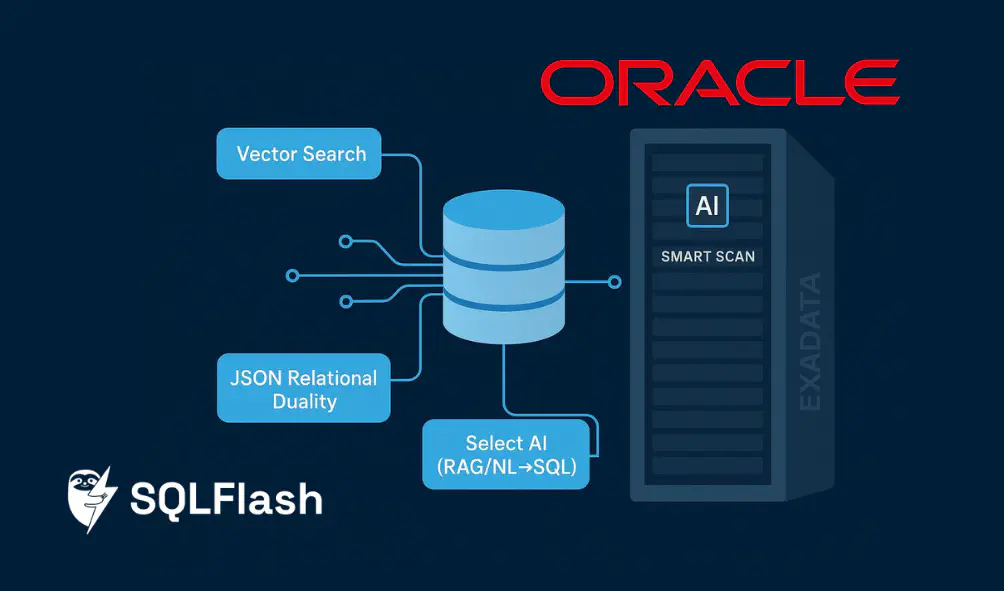
If you manage Oracle databases, you’ve likely heard terms like AI Database 26ai, Exadata System Software 25ai, and Autonomous Database Select AI. What do they actually mean for day‑to‑day DBA work? This guide breaks down the capabilities in plain terms, shows how they map to your workflows, and gives you practical cues on performance, security, and operations. Think of it as a practitioner’s handbook: no hype—just what you can do, why it matters, and how to adopt safely.
According to Oracle’s official information, AI Database 26ai succeeds 23ai via release updates—many customers can transition by applying the October 2025 release update instead of running a full upgrade—while the core AI features such as AI Vector Search and JSON Relational Duality continue and expand. You can find the vendor’s overview in the Oracle AI Database 26ai pages and announcements linked throughout this guide.
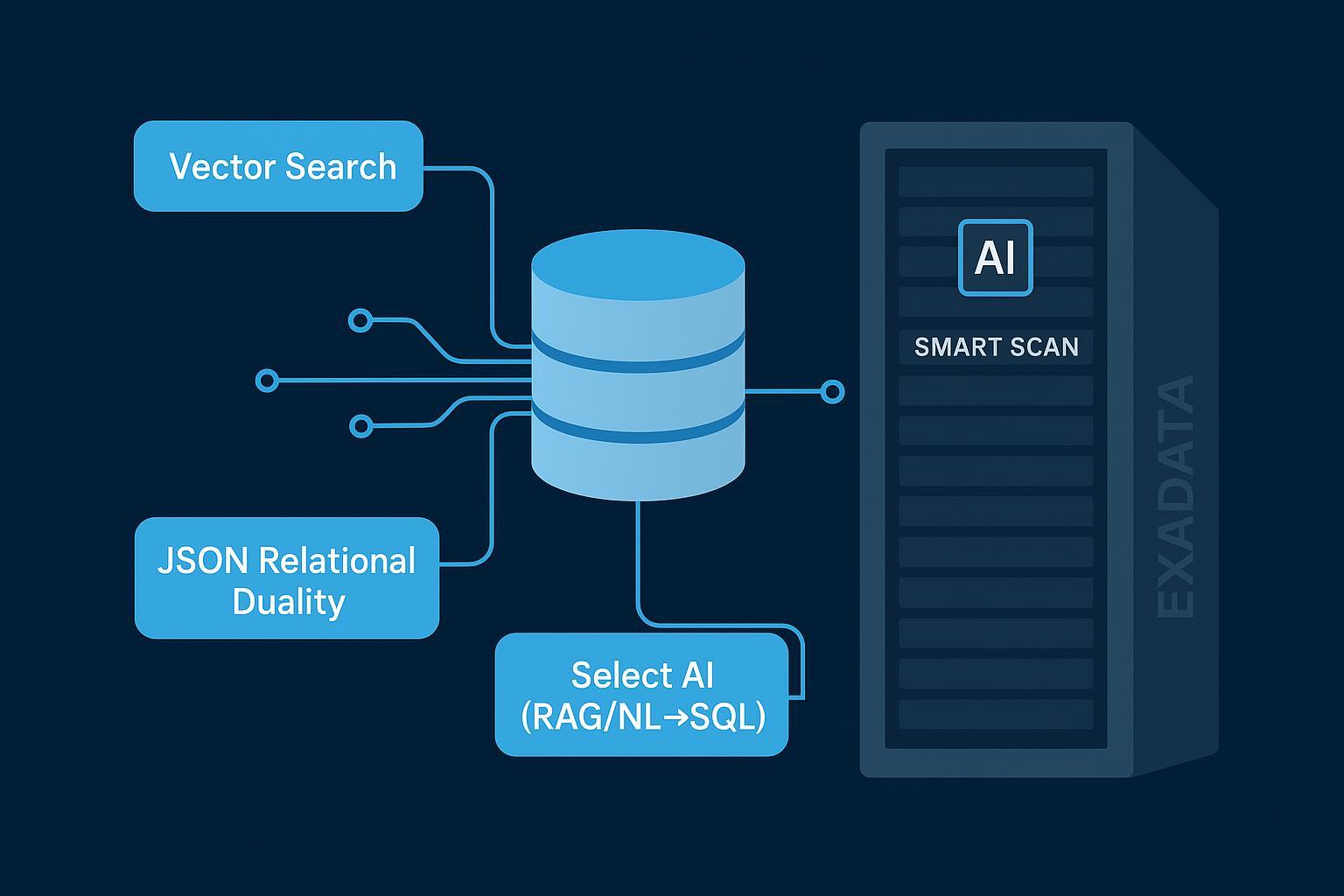
What 26ai, Exadata 25ai, and Select AI actually mean
Before we dive into specifics, let’s pin down the scope with authoritative references.
- Oracle AI Database 26ai: The successor to 23ai. It consolidates and advances built‑in AI features—AI Vector Search, JSON Relational Duality, and in‑database ML—plus integrations for agentic AI using Model Context Protocol (MCP). Oracle positions 26ai as a long‑term support release with transition from 23ai delivered via the October 2025 Release Update rather than a traditional upgrade. See the vendor’s overview in the official 26ai pages: the AI Database summary and the new features guide.
- Exadata System Software 25ai: Software releases (25.1, 25.2) for Exadata platforms that add AI‑focused offloads and manageability improvements. Key for DBAs: AI Smart Scan accelerates vector similarity queries by pushing parts of the work down to storage servers (e.g., adaptive Top‑K filtering and distance computation). Oracle’s Exadata blogs detail these capabilities with numbers and engineering context.
- Autonomous Database Select AI: Capabilities in Autonomous Database that integrate with OCI Generative AI for NL→SQL, RAG‑style retrieval, and agent workflows. DBAs configure AI profiles, privileges, and guardrails; users can review generated SQL before execution and audit conversations for compliance. Oracle’s docs provide the step‑by‑step configuration and governance patterns.
Authoritative sources for the above:
- Oracle’s AI Database 26ai overview and news announcement: see the AI Database hub and long‑term support positioning in 2025.
- Exadata 25ai blogs covering AI Smart Scan deep dives and release notes.
- Autonomous Database Select AI documentation for profiles, NL→SQL, RAG, and conversation management.
Oracle Database 26ai AI capabilities for DBAs: the five impact axes
What should DBAs plan for? Use these five lenses to evaluate adoption and prepare your roadmap.
- Workflows: NL→SQL and RAG become practical in daily operations
- Assistants using MCP and Select AI can turn natural language into reviewed SQL. In practice, that means junior analysts can query safely under your guardrails, while you retain control via approval steps and audit logs. RAG retrieves context from vector stores inside the database, reducing data movement.
- Dual access patterns (JSON documents and relational tables) cut down on ETL glue: JSON Relational Duality lets developers work with updatable JSON documents while the database continues to store normalized relational data.
- Skill stack upgrades: vectors, JSON duality, ML, agents
- Vectors: you’ll add embedding pipelines, choose index types (HNSW, neighbor partition/IVF, hybrid), and maintain stats for similarity queries.
- JSON Duality: you’ll define GraphQL‑style duality views, manage concurrency (ETAGs), and handle migrations using DBMS_JSON_DUALITY.
- ML/Agents: you’ll govern in‑database ML usage and MCP integrations—roles, credentials, and audit trails—without turning DB servers into uncontrolled execution environments.
- Performance and cost: index choices, offloads, and storage formats
- Index selections (e.g., in‑memory HNSW vs neighbor partitions) and embedding formats (FLOAT32 vs INT8/BINARY) change CPU/I/O profiles and accuracy. On Exadata, AI Smart Scan offloads distance computations and Top‑K filtering to storage cells, lowering data transfer and latency.
- Security and governance: least data movement, auditable actions
- Most AI operations stay within the DB’s transaction and security model. RBAC/CBAC, VPD, encryption, masking, and private endpoints for LLMs let you enforce policy. Select AI conversation tables provide a durable audit trail of prompts, generated SQL, and responses.
- Operational boundaries: clear roles and patch cadence
- On Autonomous Database, updates happen automatically; on self‑managed systems, you’ll schedule RUs and coordinate with application teams. Define ownership for embedding jobs, vector indexes, agent configurations, and audit retention.
Vector Search in practice: DDL, indexes, and query patterns
AI Vector Search introduces a native VECTOR data type and several index categories. You can query vectors with SQL functions and combine filters with relational predicates.
Authoritative docs: Oracle’s AI Vector Search pages and the 26ai User’s Guide and SQL Reference outline data types, parameters, and index options. Exadata deep dives explain offloads.
Example DDL (simplified):
| |
Basic similarity query pattern:
| |
Practical DBA notes:
- Embeddings and normalization: Ensure consistency (same model/version, normalization steps) or accuracy will drift. Maintain metadata tables to record embedding provenance.
- Index type selection: HNSW offers fast recall in memory; neighbor partitions scale well on large datasets and benefit from Exadata offloads. Hybrid indexes can combine text ranking with vector similarity for better relevance.
- Stats and plans: Gather stats after bulk loads; inspect execution plans to confirm index use and offload eligibility on Exadata. Expect different wait events and I/O profiles than pure relational scans.
Documentation to consult:
- Oracle’s AI Vector Search overview and FAQ describe the VECTOR type and index families.
- The 26ai SQL Reference for CREATE VECTOR INDEX covers syntax and options.
- Blog guides detail HNSW, hybrid indexes, and indexing guidelines.
JSON Relational Duality: model once, access two ways
JSON Relational Duality exposes normalized relational data as updatable JSON documents via “duality views.” Developers can read and write JSON with ACID semantics, while DBAs preserve schema integrity and performance.
What it looks like in practice:
- You define a duality view with a concise GraphQL‑style specification that maps tables and relationships to a JSON structure.
- Under the covers, data lives in relational tables; the duality view handles document composition, joins, and updates.
- Concurrency and optimistic control rely on ETAGs; you can manage multiple hierarchies over the same data.
Migration helpers:
- The DBMS_JSON_DUALITY package supports schema inference and DDL generation (INFER_SCHEMA, GENERATE_SCHEMA, INFER_AND_GENERATE_SCHEMA) plus data import and validation.
Why DBAs care:
- Less duplication: You avoid duplicating JSON stores and ETL layers.
- Governance: You keep relational privileges, auditing, and backup/recovery where they belong.
- Performance: Single round‑trip document operations with relational efficiency; test and tune as you would any view (but expect JSON document shapes to influence access paths).
References:
- Oracle’s JSON Relational Duality docs and feature overview explain the concepts and GraphQL‑based definitions.
- The DBMS_JSON_DUALITY package documentation lists procedures and parameters for migrations and validation.
Exadata System Software 25ai: AI Smart Scan and monitoring cues
Exadata 25ai introduces AI Smart Scan enhancements that push vector workload processing down to storage cells.
Key ideas (as documented in Oracle’s Exadata blogs):
- Adaptive Top‑K filtering on cells reduces data transfer to DB servers (blogs describe up to several‑fold filtering improvements). Vector Distance Projection computes distances on storage and sends compact results upstream.
- INT8 and BINARY vector formats can be significantly faster than FLOAT storage for similarity search, with guidance on accuracy trade‑offs in Oracle’s posts. Neighbor partition (IVF) offloads and contextual filters arrive across 25.1/25.2.
- Hardware matters: newer X11M platforms increase Smart Scan throughput compared to X10M, which shows up in faster index builds and scans.
What you can monitor:
- DB layer: Use AWR/ASH to spot heavy similarity queries, track wait events, and review plans. There isn’t a dedicated v$ view for vector offloads; rely on standard diagnostics.
- Storage layer: Use ExaWatcher utilities like CellSQLStat and ecstat to observe offload activity. Oracle’s blogs highlight these tools for operational visibility.
Further reading (authoritative anchors):
- Exadata 25.1/25.2 release blogs and the AI Smart Scan deep dive provide engineering‑level explanations and performance figures.
- Exadata X11M materials outline hardware throughput characteristics that influence offload performance.
Autonomous Database Select AI: NL→SQL, RAG, and governance
Select AI connects Autonomous Database to OCI Generative AI for natural‑language querying and RAG augmentation while keeping controls inside the database.
How DBAs configure it (per Oracle docs):
- Grant privileges (e.g., EXECUTE on DBMS_CLOUD_AI) and create AI profiles that specify the provider, credentials, schemas/tables, and optional vector stores.
- Users issue prompts; the system returns generated SQL for review. You can require manual approval before execution and use EXPLAIN for transparency.
- RAG retrieves context from defined vector stores to enrich answers; conversations APIs persist prompts/responses for audit and reuse.
Governance patterns:
- Use RBAC/CBAC, VPD, encryption, and masking to restrict data access.
- Configure private endpoints for LLMs, apply rate limits and budgets, and log conversations to meet compliance needs.
Docs to consult:
- Oracle’s Select AI getting started, profile management, examples, RAG configuration, and conversation management pages outline each step and control.
- Security posture and observability patterns appear in official blogs on data security and verification for Select AI.
Upgrade planning checklist
A concise checklist you can tailor to your environment:
- From 23ai to 26ai
- Validate RU eligibility and dependencies; plan to apply the October 2025 RU to transition (per Oracle’s guidance). Confirm application compatibility and test in staging even if recertification isn’t required.
- Review COMPATIBLE settings and new features gates (some AI functionality requires minimum COMPATIBLE levels).
- From 19c/21c or earlier
- Follow the standard upgrade path to 26ai. Reassess parameter baselines, resource manager plans, and diagnostics settings.
- Align schema changes for JSON Relational Duality and vector‑ready columns; build a pilot on non‑production data.
- Governance and security
- Define AI profiles, privileges, and audit retention policies for Select AI.
- If you run Exadata, update Patchmgr plans and ensure storage cells have the 25ai image; validate SELinux audit logs and permissions.
- Validation and performance
- Create synthetic or representative workloads to benchmark vector queries (HNSW vs neighbor partitions; FLOAT32 vs INT8/BINARY) and measure plan stability.
- Capture AWR baselines before/after RUs and upgrades; review flash cache behavior and offload metrics via storage utilities.
Authoritative anchors:
- Oracle’s announcement and blogs confirm transitioning to 26ai via the October 2025 RU.
- Exadata 25ai release posts provide manageability and offload details.
Troubleshooting and best practices
Keep these battle‑tested practices handy:
- Embedding hygiene: Store model/version, preprocessing, and normalization flags with each embedding row; enforce consistency at ingest.
- Index tuning: Start with neighbor partitions for large corpora; add HNSW for high‑recall subsets. Rebuild indexes when embeddings change materially.
- Plan inspection: Use EXPLAIN PLAN and AWR/ASH to verify index usage and watch for unexpected full scans. On Exadata, confirm cell offloads with storage‑side utilities.
- Duality view governance: Limit write paths to controlled roles; test optimistic concurrency and ETAG handling under multi‑session load.
- Select AI safety: Require manual approval for generated SQL; apply rate limits and budget alarms; audit conversations and rotate credentials.
References:
- Indexing guidelines and HNSW/hybrid index blogs from Oracle explain trade‑offs.
- Select AI governance and audit documentation shows how to configure approvals, logs, and private endpoints.
Cost and capacity considerations
A few framing questions to estimate cost and performance without surprises:
- Storage formats: INT8 or BINARY embeddings compress and accelerate similarity search versus FLOAT32 at some accuracy trade‑off. Test on your corpus; Oracle’s Exadata posts show speed‑ups with cell offloads.
- Consolidation vs sprawl: In‑database vectors simplify governance and reduce data movement. External vector services may offer specialized features but add integration overhead and separate security domains.
- Offload economics: On Exadata, AI Smart Scan reduces data transfer from cells, which can translate into lower DB CPU and faster query response. Measure before/after with representative workloads.
- Capacity planning: Track embedding dimension growth and index memory footprints; align with Resource Manager and flash cache policies.
Authoritative anchors:
- Exadata 25ai blogs for performance and offload behaviors.
- AI Vector Search docs for data types and index memory guidance.
A pragmatic path forward
Here’s the deal: Oracle Database 26ai brings vectors, dual access to JSON/relational data, in‑DB ML hooks, and agentic patterns into the core engine, while Exadata System Software 25ai accelerates vector workloads at the storage layer and Autonomous Database Select AI lets you add NL→SQL and RAG under governance. For DBAs, the opportunity is to cut data movement, keep audits in one place, and give teams safe, faster paths to insight.
Next steps:
- Pilot AI Vector Search with a small, representative dataset; compare HNSW vs neighbor partitions and FLOAT32 vs INT8/BINARY.
- Define at least one JSON Relational Duality view and migrate a targeted workload using DBMS_JSON_DUALITY tooling.
- If you run Exadata, schedule 25ai image updates and validate AI Smart Scan behavior on your vector queries.
- In Autonomous Database, configure Select AI profiles with approval gates and conversation auditing; start with read‑only schemas.
To dig deeper, consult:
- Oracle’s AI Database 26ai overview and new features guide for release context and capabilities.
- Exadata 25ai engineering blogs for AI Smart Scan details and operational tips.
- Autonomous Database Select AI documentation for profiles, NL→SQL/RAG configuration, and governance.
Links cited (selected authoritative anchors):
- Oracle’s AI Database 26ai overview and announcement (2025): the AI Database hub and release update guidance: https://www.oracle.com/database/26ai/ and https://www.oracle.com/news/announcement/ai-world-database-26ai-powers-the-ai-for-data-revolution-2025-10-14/
- Exadata 25ai posts and AI Smart Scan deep dive: https://blogs.oracle.com/exadata/exadata251 and https://blogs.oracle.com/exadata/exadata-ai-smart-scan-deep-dive
- Autonomous Database Select AI docs (profiles, NL→SQL, RAG, conversations): https://docs.oracle.com/en-us/iaas/autonomous-database-serverless/doc/select-ai-get-started.html and https://docs.oracle.com/en-us/iaas/autonomous-database-serverless/doc/select-ai-retrieval-augmented-generation.html
Recommended reading
What is SQLFlash?
SQLFlash is your AI-powered SQL Optimization Partner.
Based on AI models, we accurately identify SQL performance bottlenecks and optimize query performance, freeing you from the cumbersome SQL tuning process so you can fully focus on developing and implementing business logic.