How to Connect MCP to PostgreSQL/MySQL with Claude Skills | SQLFlash

If your team is tired of one-off scripts, brittle connectors, and risky ad‑hoc SQL, there’s a cleaner path. MCP gives you a standard way to expose safe database tools, and Skills encode repeatable procedures. Pair them and you get faster diagnostics and controlled access without sacrificing governance. This guide focuses on Model Context Protocol database integration patterns that help engineers work quickly while keeping production safe.
MCP vs Skills in one minute

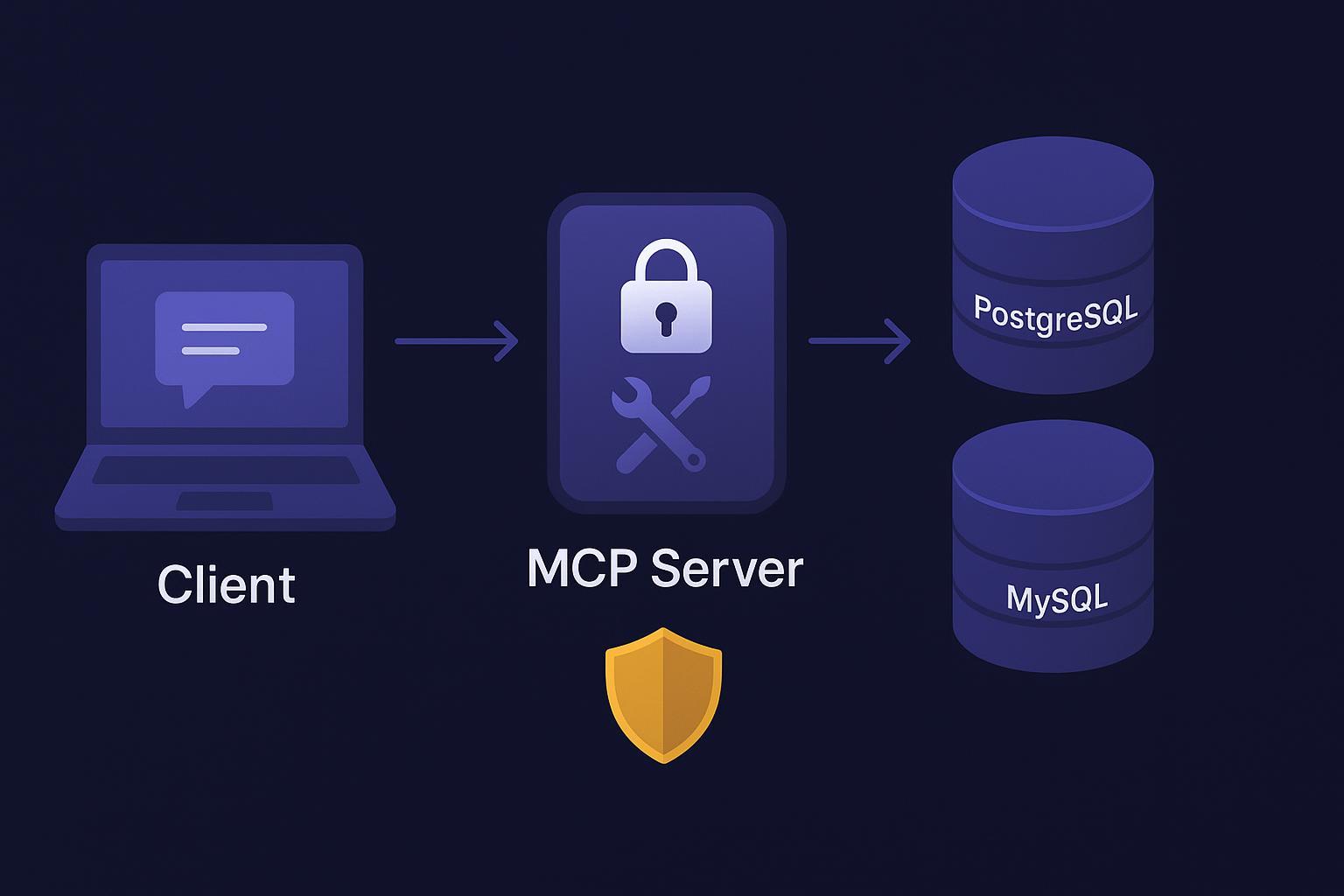
MCP (Model Context Protocol) is an open standard that lets AI hosts connect to external systems via server‑defined tools with JSON‑RPC schemas. It’s the connectivity layer. Skills are portable, file‑based packages that teach the host “how” to do a task—procedures, checks, and decision points. In practice, MCP provides the handles into PostgreSQL/MySQL, while Skills orchestrate the sequence—run EXPLAIN, review stats, propose next steps.

For background, consult the MCP tools specification and the engineering post on code execution with MCP. To understand Skills, start with the Agent Skills overview.

Model Context Protocol database integration architecture and guardrails

A practical setup has three pieces: the host/client that mediates authorization and tool calls, a small MCP server that exposes a safe subset of database operations as tools, and the database accessed through a read‑only role. To keep production safe, design with conservative defaults: least privilege, schema allowlists, parameter binding, single‑statement queries only, tight timeouts (5–10 seconds), row and payload caps, and structured audit logging with correlation IDs and PII redaction. Use stdio transport for local development and HTTPS with OAuth 2.1 plus PKCE for remote servers.

MCP’s transport documentation covers stdio vs HTTP and session management; see MCP transports. The spec also outlines security guidance—review Security best practices.

Set up the client and a local MCP DB server

Local (stdio) quickstart using Claude Code CLI:

 1
 2
 3
 4
 5
 6
 7
 8
 9
10
# Add your local MCP server (Node/TS build shown; adapt for Python)
claude mcp add --transport stdio pg \
  --env PG_DSN="postgres://ro_user:***@localhost:5432/app" \
  -- node dist/server.js

# List configured servers
claude mcp list

# Inspect server metadata
claude mcp get pg

Remote (HTTP) connector example via project config:

1
2
3
4
5
6
7
8
9
{
  "mcpServers": {
    "pg": {
      "type": "http",
      "url": "https://db-mcp.example.com/mcp",
      "headers": {"Authorization": "Bearer ${API_TOKEN}"}
    }
  }
}

Use HTTPS and OAuth for production. The spec explains scope‑based access; review Authorization best practices.

Build a minimal, secure MCP DB server

Expose four tools: run_parameterized_select for bound‑variable SELECTs with row/time limits; run_explain for EXPLAIN on parameterized queries, keeping ANALYZE under a separate elevated scope; get_db_stats for limited diagnostics (pg_stat_statements summaries or MySQL SHOW STATUS); and list_schema for schema metadata to inform audits.

Example TypeScript scaffold (Node + pg/mysql2):

  1
  2
  3
  4
  5
  6
  7
  8
  9
 10
 11
 12
 13
 14
 15
 16
 17
 18
 19
 20
 21
 22
 23
 24
 25
 26
 27
 28
 29
 30
 31
 32
 33
 34
 35
 36
 37
 38
 39
 40
 41
 42
 43
 44
 45
 46
 47
 48
 49
 50
 51
 52
 53
 54
 55
 56
 57
 58
 59
 60
 61
 62
 63
 64
 65
 66
 67
 68
 69
 70
 71
 72
 73
 74
 75
 76
 77
 78
 79
 80
 81
 82
 83
 84
 85
 86
 87
 88
 89
 90
 91
 92
 93
 94
 95
 96
 97
 98
 99
100
101
102
103
104
105
106
107
108
109
110
111
112
113
114
115
116
117
118
119
120
// server.ts — minimal MCP server for PostgreSQL/MySQL (read-only)
import { createServer } from "mcp-server"; // illustrative import; follow your MCP framework
import pg from "pg";
import mysql from "mysql2/promise";

const pgPool = new pg.Pool({ connectionString: process.env.PG_DSN });
const my = await mysql.createPool({ uri: process.env.MYSQL_DSN! });

function redact(value: unknown) {
  // simple PII redaction; expand per policy
  return value;
}

const server = createServer({
  tools: [
    {
      name: "run_parameterized_select",
      description: "Execute a parameterized SELECT with limits",
      inputSchema: {
        type: "object",
        properties: {
          dialect: { type: "string", enum: ["postgres", "mysql"] },
          sqlTemplateId: { type: "string" },
          params: { type: "array" },
          limit: { type: "integer", minimum: 1, maximum: 10000 },
          timeout_ms: { type: "integer", minimum: 100, maximum: 10000 }
        },
        required: ["dialect", "sqlTemplateId"],
        additionalProperties: false
      },
      outputSchema: {
        type: "object",
        properties: {
          rows: { type: "array", items: { type: "object" } },
          row_count: { type: "integer" },
          truncated: { type: "boolean" }
        },
        required: ["rows", "row_count", "truncated"],
        additionalProperties: false
      },
      async call({ dialect, sqlTemplateId, params = [], limit = 1000, timeout_ms = 5000 }) {
        const sql = allowlist.get(sqlTemplateId); // vetted, parameterized templates only
        if (!sql) throw new Error("template not allowed");
        const limitedSql = `${sql} LIMIT ${Math.min(limit, 10000)}`;
        const start = Date.now();
        const rows = dialect === "postgres"
          ? (await pgPool.query({ text: limitedSql, values: params, rowMode: "array" })).rows
          : (await my.query({ sql: limitedSql, values: params, timeout: timeout_ms }))[0] as any[];
        const duration = Date.now() - start;
        audit.log({ tool: "run_parameterized_select", sqlTemplateId, row_count: rows.length, duration });
        const truncated = rows.length >= limit;
        return { rows: rows.map(redact), row_count: rows.length, truncated };
      }
    },
    {
      name: "run_explain",
      description: "Return EXPLAIN for a parameterized SELECT",
      inputSchema: {
        type: "object",
        properties: {
          dialect: { type: "string", enum: ["postgres", "mysql"] },
          sqlTemplateId: { type: "string" },
          params: { type: "array" },
          format: { type: "string", enum: ["TEXT", "JSON"], default: "TEXT" },
          analyze: { type: "boolean", default: false }
        },
        required: ["dialect", "sqlTemplateId"],
        additionalProperties: false
      },
      async call({ dialect, sqlTemplateId, params = [], format = "TEXT", analyze = false }) {
        if (analyze && !auth.hasScope("db.explain.analyze")) {
          throw new Error("scope required for ANALYZE");
        }
        const sql = allowlist.get(sqlTemplateId);
        if (!sql) throw new Error("template not allowed");
        if (dialect === "postgres") {
          const explainSql = `EXPLAIN ${format === "JSON" ? "(FORMAT JSON)" : ""} ${analyze ? "ANALYZE" : ""} ${sql}`;
          const res = await pgPool.query({ text: explainSql, values: params });
          return format === "JSON" ? { plan_json: res.rows[0]["?column?"] } : { plan_text: res.rows.map(r => Object.values(r).join(" ")).join("\n") };
        } else {
          const explainSql = `EXPLAIN ${format === "JSON" ? "FORMAT=JSON" : ""} ${sql}`;
          const [rows] = await my.query(explainSql, params);
          return format === "JSON" ? { plan_json: rows[0] } : { plan_text: JSON.stringify(rows, null, 2) };
        }
      }
    },
    {
      name: "get_db_stats",
      description: "Return limited stats for diagnostics",
      inputSchema: { type: "object", properties: { dialect: { type: "string", enum: ["postgres", "mysql"] } }, required: ["dialect"] },
      async call({ dialect }) {
        if (dialect === "postgres") {
          const res = await pgPool.query("SELECT calls,total_exec_time,mean_exec_time FROM pg_stat_statements ORDER BY total_exec_time DESC LIMIT 5");
          return { top: res.rows };
        } else {
          const [rows] = await my.query("SHOW STATUS LIKE 'Threads_connected';");
          return { status: rows };
        }
      }
    },
    {
      name: "list_schema",
      description: "List tables/columns/indexes",
      inputSchema: { type: "object", properties: { dialect: { type: "string", enum: ["postgres", "mysql"] } }, required: ["dialect"] },
      async call({ dialect }) {
        if (dialect === "postgres") {
          const tables = await pgPool.query("SELECT table_schema,table_name FROM information_schema.tables WHERE table_type='BASE TABLE'");
          const indexes = await pgPool.query("SELECT indexname,tablename,indexdef FROM pg_indexes");
          return { tables: tables.rows, indexes: indexes.rows };
        } else {
          const [tables] = await my.query("SELECT table_schema,table_name FROM information_schema.tables WHERE table_type='BASE TABLE'");
          const [indexes] = await my.query("SELECT TABLE_NAME,INDEX_NAME,COLUMN_NAME FROM information_schema.statistics");
          return { tables, indexes };
        }
      }
    }
  ]
});

server.start();

PostgreSQL EXPLAIN formats are documented in the official manual. MySQL’s EXPLAIN output formats are covered in MySQL’s EXPLAIN documentation.

Author Claude Skills that call your tools

Skills package repeatable workflows. Keep them small and explicit. Here’s a minimal skeleton:

 1
 2
 3
 4
 5
 6
 7
 8
 9
10
11
12
13
---
name: slow-query-triage
description: Diagnose slow SELECT queries safely using EXPLAIN and limited stats
---

Goal
Identify plan red flags and suggest safe next steps without running heavy queries on production.

Procedure
Call run_explain with format=TEXT on the provided SQL template and params. Parse for red flags: sequential scans on large tables, nested loops with high row estimates, missing indexes on join predicates. Optionally call get_db_stats for a top-level view of recent heavy queries. Produce a concise report and candidate index suggestions when warranted.

Permissions
Requires ability to call run_explain and get_db_stats on the configured MCP server. Keep ANALYZE gated under a db.explain.analyze scope.

In Claude Code, you can restrict which tools a skill can call via configuration; see Skills best practices.

Three mini examples you can run today

Slow-query triage

Provide a parameterized SELECT and its params. Run EXPLAIN without ANALYZE. Check for sequential scans, problematic join orders, and missing indexes. In PostgreSQL, compare estimates to actuals only in a safe sandbox with ANALYZE; otherwise rely on estimates and stats. The EXPLAIN command is described in the PostgreSQL EXPLAIN manual. In MySQL, favor EXPLAIN FORMAT=JSON for richer detail; see MySQL’s EXPLAIN output reference.

Example prompt to the skill:

1
Given template "orders_by_customer" with params [123, "2025-01-01", "2025-12-31"], run EXPLAIN and flag any large sequential scan or missing index on (customer_id, created_at).

Index audit and candidate proposal

Use list_schema to enumerate current indexes. Review WHERE predicates and JOIN keys from typical queries. Propose a composite index if selectivity warrants, then validate with run_explain on the representative query.

Safe migration dry‑run

Compare schema snapshots via list_schema and flag operations that require full table rebuilds. Estimate impact via small sample row counts and index rebuild heuristics. Produce a rollout plan with backout steps and monitoring hooks—watch p95 latency and deadlocks. Keep ANALYZE off on production during validation. For deeper diagnostics, PostgreSQL environments often use pg_stat_statements; see pg_stat_statements documentation.

Governance and compliance for architects

Keep least privilege across the stack. Separate scopes for EXPLAIN vs ANALYZE and default to read‑only. Minimize data by using parameterized templates, capping rows, redacting PII in logs, and avoiding large result sets in chat context. Apply RBAC so only specific roles can install or invoke servers and skills; require approvals for elevated scopes. Audit with structured logs and correlation IDs, rotate tokens, and review access regularly. Pin versions, verify signatures when available, and vet third‑party servers and skills.

The spec outlines security guidance—review Security best practices.

Troubleshooting and sensible limits

Authentication failures typically come from mismatched OAuth client registrations, redirect URIs, or scope alignment. Timeouts indicate heavy queries; prefer EXPLAIN over ANALYZE and block long‑running tool calls. If desktop or CLI connectors misbehave, restart, check OS permissions, and verify extension settings. Manage context pressure by keeping intermediate results out of conversation history and summarizing large payloads.

Operational limits that work well include 5–10 seconds per tool call, caps of 1–10k rows, strict payload truncation with a visible “truncated” flag, and single‑statement queries only. Block DDL and DML except in tightly controlled sandboxes. For client configuration and debugging tips, consult Claude Code’s MCP documentation.


Build the server locally, wire it to Claude, and try the three Skills. Start small, keep guardrails tight, and expand scopes only when the procedure is proven. What workflow do you want to automate next—index maintenance windows or query‑store‑driven regressions?

What is SQLFlash?

SQLFlash is your AI-powered SQL Optimization Partner.

Based on AI models, we accurately identify SQL performance bottlenecks and optimize query performance, freeing you from the cumbersome SQL tuning process so you can fully focus on developing and implementing business logic.

How to use SQLFlash in a database?

Ready to elevate your SQL performance?

Join us and experience the power of SQLFlash today!.